What is ActivInspire?
ActivInspire is educational software that educators can use to engage and inspire their students. Teachers can take boring lessons and make them come to life by using ActivInspire on the Promethean board. Teachers can create lessons called flipcharts using ActivInspire. This program is interactive and allows students to participate in their learning and be creative with their thinking. Teachers can use ActivInspire to teach concepts, assess student learning and motivate student thinking. ActivInspire has dual-functionality and allows multiple users to engage with board at the once. Students can be hands-on with the board and manipulate it show their understanding. There are many templates available for teacher use as well as appealing visuals for students.
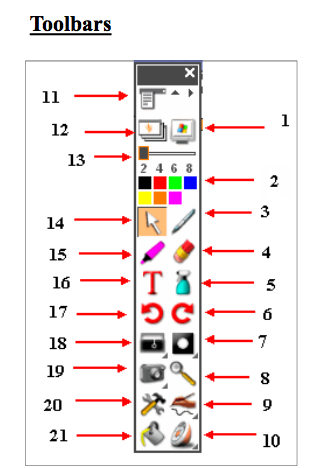
1. Annotate over desktop 2. Color Palette 3. Pen Tool 4. Eraser Tool 5. Clear Tool 6. Undo Button 7. Spotlight Tool 8. Page Zoom 9. Handwriting Recognition 10. Activotes | 11. Menu Button 12. Flipchart Button 13. Pen Width 14. Select Tool 15. Highlighter 16. Text Tool 17. Undo Button 18. Reveal Tool 19. Camera 20. Power Tools 21. Fills Colors |
Key Features
- Dual interface
- Support for mathematics instruction
- Compatible with Windows and Mac
- Stream content and data directly from websites into flipcharts
- Advanced pen functionality
- Extensive customization features
- Integrate files and content from a variety of other applications
- Two users can interact simultaneously promoting collaboration.
- Easily Shared
How to use ActivInspire
Watch the YouTube tutorial below on how to use ActivInspire to create lessons. The tutorial provides introductions on how to use the software and how to use the different tools.
